


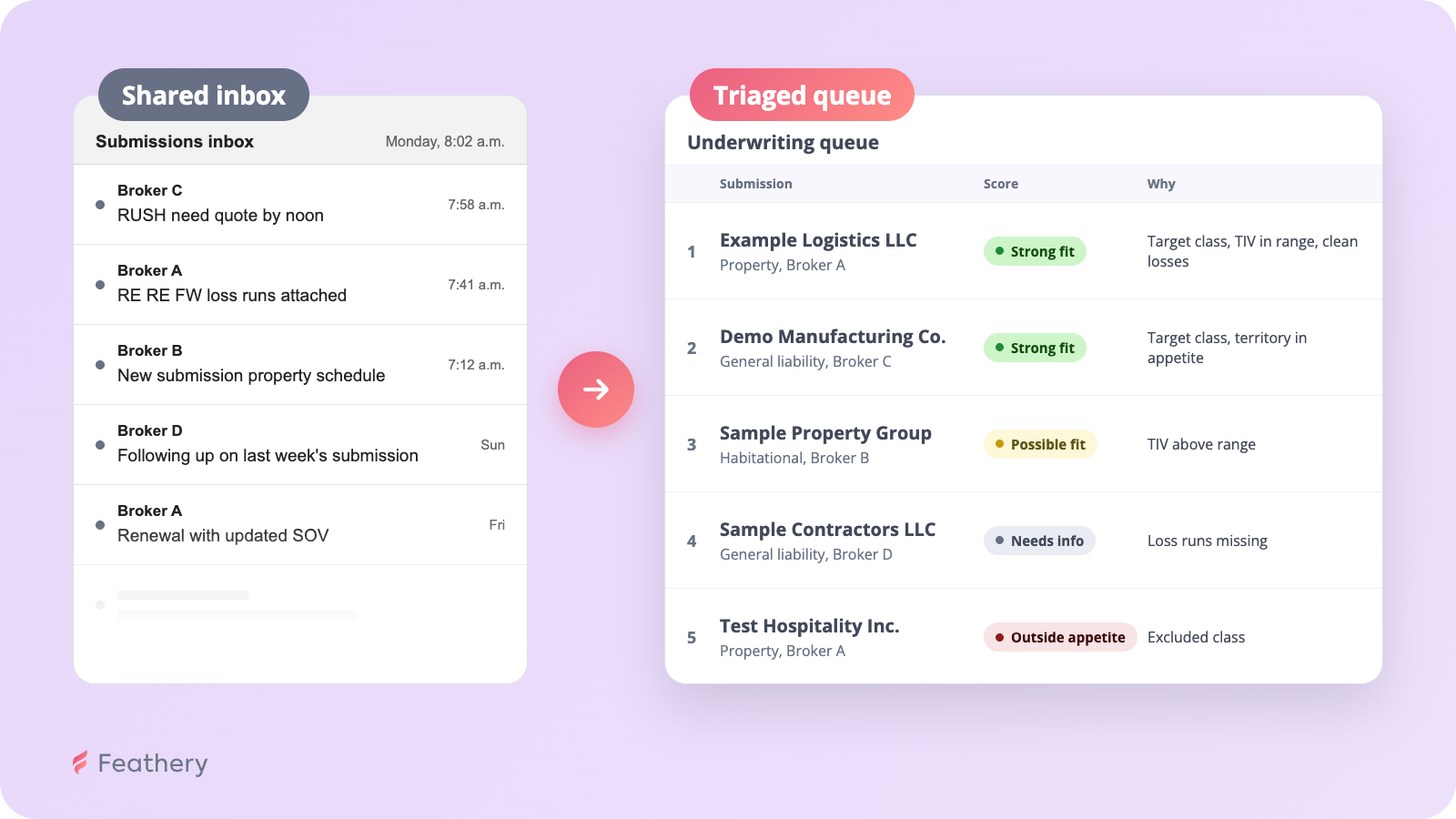
It’s 8:02 a.m. on a Monday, and your submission inbox already holds more than your team can get through today. Somewhere in there is a Florida habitational submission from one of your best brokers. It came on Friday evening with a note: quote it this week and it’s yours. Right now, it’s stuck behind a dozen risks you’ll never write.
Carriers and MGAs automate submission triage to fix that. Automated triage reads each broker submission and checks that it’s complete. It runs clearance and scores the submission against written appetite rules. Then it sends the best-fit risks to underwriters first.
Without triage, priority depends on whoever opens the email first. Nobody records why one account moved ahead of another. And that broker with the Florida account places it somewhere else.
This guide covers each step, a simple scoring model, what stays with underwriters, and how to roll it out.
What is submission triage?
Submission triage is the step between receiving a broker submission and an underwriter reviewing it. A submission is the package a broker sends to get a quote. It usually includes an ACORD application, loss runs, and a statement of values or schedules. No two arrive in quite the same shape.
Triage answers three questions for every submission:
- Is it complete?
- Does it fit appetite?
- How soon should someone work it?
In most teams, someone answers these in their head. An underwriter or assistant skims the email and opens a few attachments. Then they decide what to look at first. That works at 20 submissions a day. It breaks down at 200.
Triage often gets lumped in with two steps that sit next to it.
Each step fails in a different way, so it helps to keep them apart. Skip intake, and you’re scoring bad data. Skip clearance, and two brokers get quoted on the same risk. Skip triage, and submissions get worked in the order they arrived.
If intake is the part you’re still solving, start with our guide to AI for submission intake.
How manual triage costs carriers and MGAs business
Rush requests, renewals, and new business all land in the same submission inbox along with all the other emails and communications. They come from different brokers in different formats. Nobody designed it this way. The inbox became the workflow because it was already there. Every team built its own habits on top of it.
Those habits cost you in three ways.
You lose the race to quote. Brokers put real work into every submission. Some 60% of agents say one commercial submission to one carrier takes them more than 30 minutes. More than half send each risk to more than four carriers. The same survey found that quote speed affects how much business an agent sends a carrier. Every hour a submission sits unread is an hour your competitors can use.
You spend time on risks you’ll never write. Carriers decline over 25% of small commercial submissions and a third of more complex ones. Someone still has to open, read, and answer each one only to find that the submission isn’t within appetite.
Your team chases instead of underwriting. Incomplete submissions stall while someone emails the broker for missing items. Meanwhile, brokers call for status because nothing has moved.
How do you automate submission triage, step by step?
The easiest way to see automated triage is to follow one submission through it. Go back to that Florida submission from Monday morning. It’s a schedule with $31 million in total insured value (TIV), plus an ACORD application. The broker’s email says the loss runs are “coming.”
By hand, that email waits its turn. In an automated workflow, seven things happen before an underwriter opens it:
- Capture every submission. Emails and attachments from the inbox, broker portals, and file shares land in one queue.
- Extract the triage fields. The ACORD application, loss runs, and statement of values (SOV) are read for class, location, exposure, limits, effective date, and loss history.
- Check completeness. Missing documents or fields are flagged. A follow-up to the broker is drafted, and an underwriter has a clear view of what is missing at outset.
- Run clearance. The insured is matched against existing accounts and open submissions. That way, two brokers aren’t quoted on the same risk.
- Score against appetite. Written appetite rules are applied. Each score shows the reasons behind it.
- Rank and route. The queue is ordered by fit, effective date, and broker priority. Each submission goes to the right underwriter or team.
- Hand off clean data. The structured submission is sent to the policy administration system or underwriting workbench.
Here’s how that plays out for the Florida file. It’s captured the moment it arrives. The schedule and application are read automatically. The missing loss runs trigger a follow-up to the broker before anyone on your team sees the email.
Clearance finds no open submission for the insured. When your property underwriter sits down, the file is already in the right queue. It has a score, a flag for the missing loss runs, and one line explaining both. Nobody skimmed, sorted, or forwarded anything.
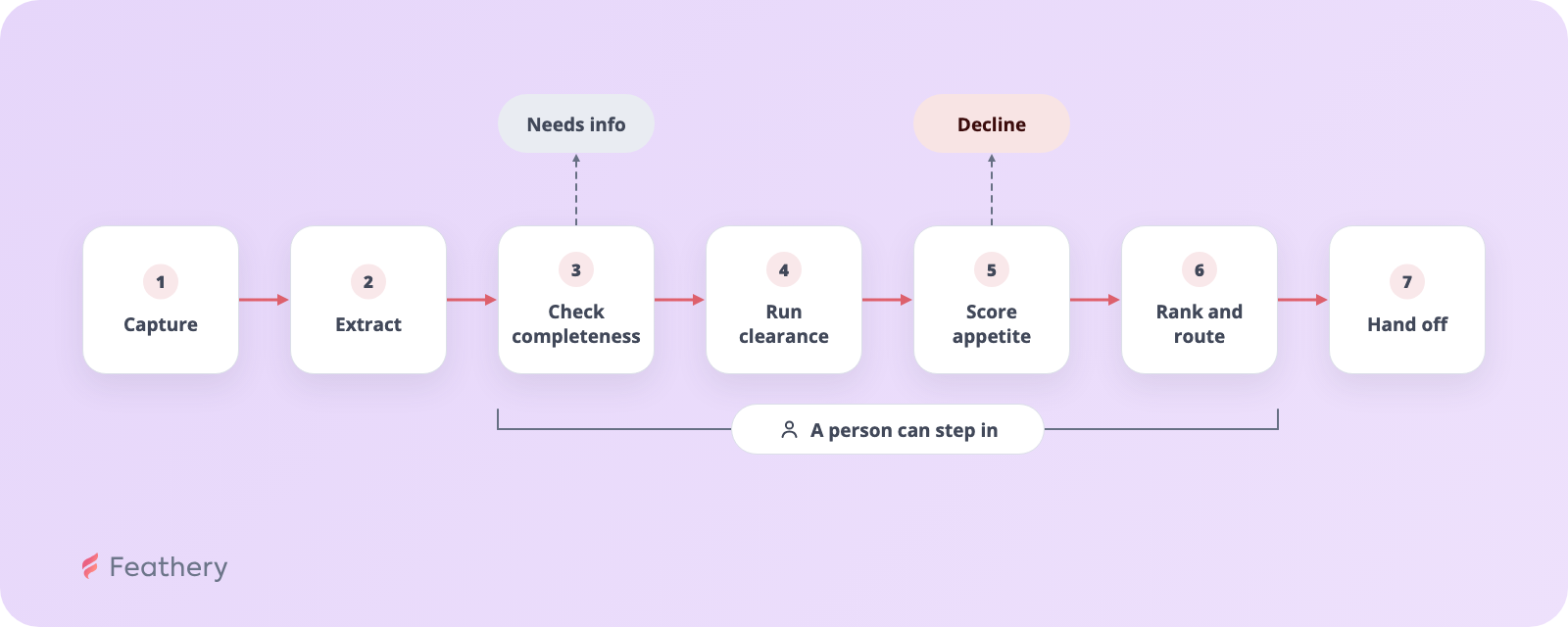
The order of those steps is deliberate. Completeness and clearance come before scoring. That way, the score knows what’s missing. Missing loss runs don’t mean a clean loss history.
Watch for
Scoring a submission before checking that it’s complete ranks guesses, not risks. Run completeness and clearance first. Then flag incomplete files, or hold them in their own queue.
Data needed for submission triage (and where it comes from)
Step two, extracting the triage fields, is where most of the hard work sits. The answers are almost always in the package. They’re just scattered. TIV sits on the third tab of a spreadsheet. The class of business reads one way on the ACORD form and another way in the broker’s email.
Loss runs arrive as scans from three prior carriers. Each one has its own layout. An experienced underwriter knows where to look. That’s exactly why this work lands on your most experienced people.
Most triage fields come from three documents: the ACORD application, the loss runs, and the statement of values. The broker’s email fills in the rest. If extraction gets a field wrong, the score is wrong too.
Reading those documents is a job for document intelligence, with one condition. Each extracted value needs a confidence score and a link back to where it appears in the source document.
A reviewer checks anything the model isn’t sure about. Nothing moves forward as a black box. For the Florida file, that might be the TIV figure on a scanned schedule, flagged for a quick look. It’s worth the check, since TIV is one of the numbers that decides the score.
What does a simple triage scoring model look like?
Resist the urge to build a 40-factor model on day one. Underwriters will trust a simple score they can read long before they trust a clever one they can’t.
A good starting point is three bands tied to written appetite rules. Each score should show the rule that triggered it, so an underwriter can agree with it or override it.

The Florida file lands in yellow. The class and territory fit, but the TIV sits above the range your guidelines set, and the loss runs are still outstanding.
That’s a useful answer. In one glance, the underwriter knows the account is worth a look and what’s holding it up. The broker has already been asked for the missing piece.
Triage scorecard

How the triage scorecard works
The scorecard asks five questions about one submission and returns one of three results. It runs in your browser.
- Outside appetite (red): The class of business isn’t in your appetite, or the location isn’t in your territory.
- Strong fit (green): Every answer is the first option. The class is in appetite, and the location is in territory. The exposure is in range, the loss history is clean, and the submission is complete.
- Possible fit (yellow): Everything else.
For example, take a submission in your appetite class and territory with a clean loss history. If the exposure is above your range, it scores as a possible fit. The scorecard suggests routing it to an underwriter with a flag. The result is a guide based on your answers, not an underwriting decision.
What should be automated, and what stays with underwriters?
Underwriting leaders often ask us some version of “Is this a black box?” It’s the right question. Nobody who has spent 20 years building a book wants software deciding which risks they write.
We agree. Automation handles the reading, checking, and sorting. Underwriters keep every judgment call.
Look at the right-hand column. Every item in it is something an underwriter does better than software. Each one is a judgment call: weighing a relationship, reading a conflict, or deciding an exception is worth making.
The left-hand column is the work that eats the morning today. Moving it off the desk gives underwriters that time back.
Best way to roll out automated triage
The safest rollouts start small. They prove themselves before they touch a single routing decision. Underwriters have seen plenty of tools arrive with big promises. So the goal of the first month is trust. Coverage comes later.
A six-step sequence works for most teams:
- Record your baseline. Before any rule goes live, write down where you stand today. The metrics in the next section show what to track.
- Define and document appetite. Turn underwriting guidelines into rules a system can apply, and a person can read. Start with the red rules. Excluded classes and territories are usually the clearest lines in your guidelines. They’re the fastest to write down and the easiest to test.
- Start with one line. Pick a line of business with steady volume and clear guidelines.
- Run in shadow mode. Score submissions without changing routing. Then compare the scores against what underwriters chose.
- Turn on routing. Once overrides settle, route green submissions to underwriters and red ones to a decline queue for confirmation. Keep yellow with a person.
- Expand. Add lines, brokers, and automatic declines one at a time.
Shadow mode is the step teams are most tempted to skip. It’s also the one that earns buy-in. When an underwriter sees the system score 50 submissions the way they would have, the conversation changes.
Defining and documenting appetite is usually the hardest step. Appetite often lives in a PDF, a few emails, and the heads of your most senior people. Getting it into plain rules is worth doing even if you never automate anything.
Ask Robin
“Send any Florida habitational submission with TIV over $25 million to the property referral queue.”
Robin, Feathery’s AI workflow assistant, turns the request into a routing rule and adds it to the triage workflow. Your team reviews and approves the change before it goes live.
Metrics that show triage is working
If you can’t show the before, nobody will believe the after. Track these five numbers from your baseline through the first few months:
- Time to first touch: from submission received to an underwriter opening it
- Time to quote: from submission received to quote returned
- Missing-information rate: the share of submissions that need a broker follow-up
- Override rate: how often underwriters change the system’s score, and why
- Hit ratio by score: whether green submissions bind more often than yellow ones
The first two are the ones brokers feel. Missing-information rate shows how much chasing your team does, and which brokers cause most of it. The last two show whether the scoring works.
Watch override rate most closely in the first month. In shadow mode, it’s how often the score disagrees with what underwriters chose. A high rate early on is normal. It usually means the written rules don’t yet match how your underwriters really think. Every override is a note on what to fix.
How Feathery automates submission triage
Feathery runs underwriting submission intake and triage as one workflow with human review built in. It reads the submission inbox, extracts and validates the data, and flags missing items. Then it runs clearance, scores fit against your appetite rules, and routes the ranked queue to underwriters.
Every score shows the rule behind it and each action is logged, so you always know why one account moved ahead of another.
Underwriting operations can update appetite rules and routing in plain language through Robin. See how Robin builds a workflow from a plain-language request.
Feathery works on top of the core systems carriers and MGAs already run, such as Guidewire, so underwriters stay in the tools they know.
By the numbers
6 hours to under 10 minutes
Average quote response time at a top cyber carrier after it automated submission intake, clearance, and routing
Triage is also where better portfolio data starts. Once every submission is structured and scored, AI portfolio submission analytics can show which brokers, classes, and territories deserve more of your underwriters’ time. For the wider picture, see our guide to insurance workflow automation.
Frequently asked questions
What is submission triage in insurance?
Submission triage is the step where a carrier or MGA sorts incoming broker submissions by fit and priority before underwriting review. It decides which submissions an underwriter sees first, which need more information, and which fall outside appetite.
How is submission triage different from clearance?
Clearance checks whether the carrier is already working the same risk through another broker. Triage decides how well a cleared submission fits appetite and how urgently it should be worked. Most automated workflows run clearance first, then triage.
Can AI decline submissions automatically?
Yes, AI can decline submissions automatically, but most carriers and MGAs don’t start there. Usually, the system drafts the decline and an underwriter confirms it. Automatic declines come later, for clear-cut cases, once the out-of-appetite rules have proved reliable.
How do we know why a submission got its score?
Every score should show the appetite rule that triggered it, and every extracted value should link back to its place in the source document. If an underwriter can’t see the reason in one click, the score won’t be trusted, and it shouldn’t be.
Will automated triage work with Guidewire or our existing core system?
Yes. Feathery sends triaged submission data into the systems carriers already use, such as Guidewire and Duck Creek, so underwriters keep working in the tools they know.
How long does it take to set up automated submission triage?
Setup time for automated submission triage depends on how clearly appetite is written down and how many lines are in scope. The fastest path is to start with one line of business and its existing guidelines. Most of the team’s time goes into confirming the rules.
What if underwriting appetite isn’t documented well?
Many carriers and MGAs don’t have their appetite fully documented. It often lives in a PDF, a few emails, and the heads of senior underwriters. Start with the clearest rules, like excluded classes and territories. Writing those down is worth doing even before you automate triage.


